The previous article went through the Kronk SDK: a batching engine, a conversation cache, and a pile of workarounds behind a very small public API. All of it rested on three assumptions: that the model file was already on disk, that somebody had chosen a context size that fits in your VRAM (the GPU’s own memory), and that if you asked for a second model there’d be room for it.
So rather than tour the code layer by layer, let’s follow the models themselves through the system: how they sit on your disk, how one gets there in the first place, where their configuration comes from, how Kronk works out whether your machine can hold one, and what happens when a request finally asks for one that isn’t loaded.
📌 A note on scope
Everything here is against Kronk v1.32.6.
Storing models
Let’s start simple, with how Kronk stores a model on your disk. And for that we first need to understand how it names one.
Kronk identifies a model by provider, family and model, and the easiest place to see all three at once is the HuggingFace URL the file comes from:
https://huggingface.co/unsloth/Qwen3-0.6B-GGUF/blob/main/Qwen3-0.6B-Q8_0.gguf
                       └─────┘ └─────────────┘           └─────────────┘
                      Provider     Family                     Model
With those three you can find the file itself, because they are the path: everything lands under $HOME/.kronk, in a tree with this shape.
$HOME/.kronk/
├── models/
│   ├── .index.yaml
│   ├── model_config.yaml
│   └── unsloth/Qwen3-0.6B-GGUF/
│       └── Qwen3-0.6B-Q8_0.gguf
└── …
Inside Kronk, though, a model isn’t named that way. The canonical id is provider/model — unsloth/Qwen3-0.6B-Q8_0 — and it takes an optional third segment which isn’t the family but a profile: a named configuration of the same physical model, as in unsloth/Qwen3-0.6B-Q8_0/AGENT, which would be the AGENT profile configuration for the unsloth/Qwen3-0.6B-Q8_0 model. Two segments, or three with a profile; fewer or more is an error.
So the id gives you two of the path’s three parts, and something has to know the third — you never typed Qwen3-0.6B-GGUF. That’s the first reason for .index.yaml: translating the provider/model you type into the provider/family/model that’s actually on disk.
The second is that a model is not necessarily a file. Big ones arrive from HuggingFace in shards — …-00001-of-00003.gguf and friends. Others come with companions, files that belong to a model without being it: a multimodal projector that turns image patches into embeddings, or a small speculative head that ships with the model and guesses the next few tokens, so the big one can check them in a single pass (speculative decoding).
And the third is that somebody has to remember how big all of that is, and whether it ever finished downloading.
So it keeps one entry per id, pointing at whatever pile of files is actually behind it (sdk/tools/backend/catalog.go:13).
The other file in there, model_config.yaml, is where your own per-model settings live — context size, cache precision, sampling and a few dozen more. And it’s where those profiles live: one entry per profile, so the id you ask by decides which settings apply. We’ll come back to that file.
But all of this assumes you already have models on your machine, and the first thing you probably want is to get one. That’s where the catalog comes in. Let’s see how it works.
The catalog
We saw that .index.yaml covers the models you already have. But the first time you ask for unsloth/Qwen3-0.6B-Q8_0 there’s nothing on disk to look at, and the name on its own doesn’t get you far: it isn’t a URL, and it never said which HuggingFace repository the file lives in or what the file is called. Working that out is the catalog’s job, and it keeps the answers in its own file, $HOME/.kronk/catalog/catalog.yaml (sdk/tools/defaults/yaml/catalog.yaml).
An entry is the recipe for fetching one model: the repo it came from, the revision (the branch or tag, usually main), the exact filenames, and their sizes. Once you have those, building a download URL is string concatenation.
So say you want to know more about a model — which repo it lives in, which files it’s made of, how big they are. You ask for it by its canonical id, unsloth/Qwen3-0.6B-Q8_0, and Kronk looks in three places, in order (sdk/tools/models/catalog.go:210): its cache, which is this same catalog.yaml; then HuggingFace; then your own disk.
The cache one is the simple one: the canonical id is the key, so a hit answers straight away.
The HuggingFace step is the most interesting, because it does more than you’d expect: it searches. Your id never said which repo the file is in, so Kronk drops the quantization suffix — unsloth/Qwen3-0.6B-Q8_0 becomes a search for Qwen3-0.6B — asks HuggingFace which of unsloth’s repos match, and opens each candidate until one of them holds Qwen3-0.6B-Q8_0.gguf (sdk/tools/models/catalog.go:823). That’s the missing family, found. Whatever it learns goes back into catalog.yaml, so it searches once per model.
And your disk is the fallback: Kronk looks the id up in .index.yaml and takes the family from the directory those files sit in.
So a name becomes a repo, a list of files and a set of URLs — everything you need to start a very long download.
Can this machine even run it?
Before spending twenty minutes downloading something, it would be nice to know whether it can run at all. Kronk answers that with a package whose entire job is working out how much room a model needs, and everything that model needs along with it — sdk/kronk/vram (sdk/kronk/vram/vram.go:155).
The calculation works out how much room the model weights take, the KV cache, the compute buffer needed for the maths itself, and anything else the model has to keep in memory. And it distinguishes how much of that memory goes to the GPU and how much stays on the CPU. Bill Kennedy has written a whole post on that formula, so I won’t go through it again here. What’s interesting from the inside is where those numbers come from.
Start with the file. A .gguf keeps its metadata right at the front: a block of key-value pairs and the tensor list, which between them give up the layer count, the KV head count, key and value lengths, the context the model was trained for, and plenty more metadata about the model.
If you already have the file, this is easy: read the metadata off the disk and you’re done. And if you don’t, the calculator still only needs the beginning of the file, so FromHuggingFace (sdk/kronk/vram/http.go:21) takes that literally: an HTTP Range request asking HuggingFace for the first sixteen megabytes of the GGUF file, which might be thirty gigabytes, and nothing more. With that we have the model’s metadata, whether the model is on your disk or not.
The other half of the input is your hardware, and that’s a device snapshot taken once at startup: how many GPUs there are, what each one is and how many bytes it has free and in total, how much system RAM the box has, whether GPU offload is possible at all, and whether the GPU and the CPU share the same memory. With that we know how much room our model takes and how much CPU and GPU memory our system has, so we can tell whether it fits or not.
And now that you know whether your machine can run it, you fetch the thing — through the same machinery we saw in the yzma article , a plain URL download over go-getter. The only difference is where the files land: the provider/family/model path we talked about above.
So now you have the model on your disk. What you still don’t have is the configuration it will be loaded with, and that isn’t one setting but a whole stack.
Model configuration
That stack exists because llama.cpp needs far more than a model id: a context size, a KV cache precision, sampling parameters — a couple of dozen numbers you never chose. Kronk settles all of them once per load, in layers (sdk/tools/models/kronkresolve.go:43):
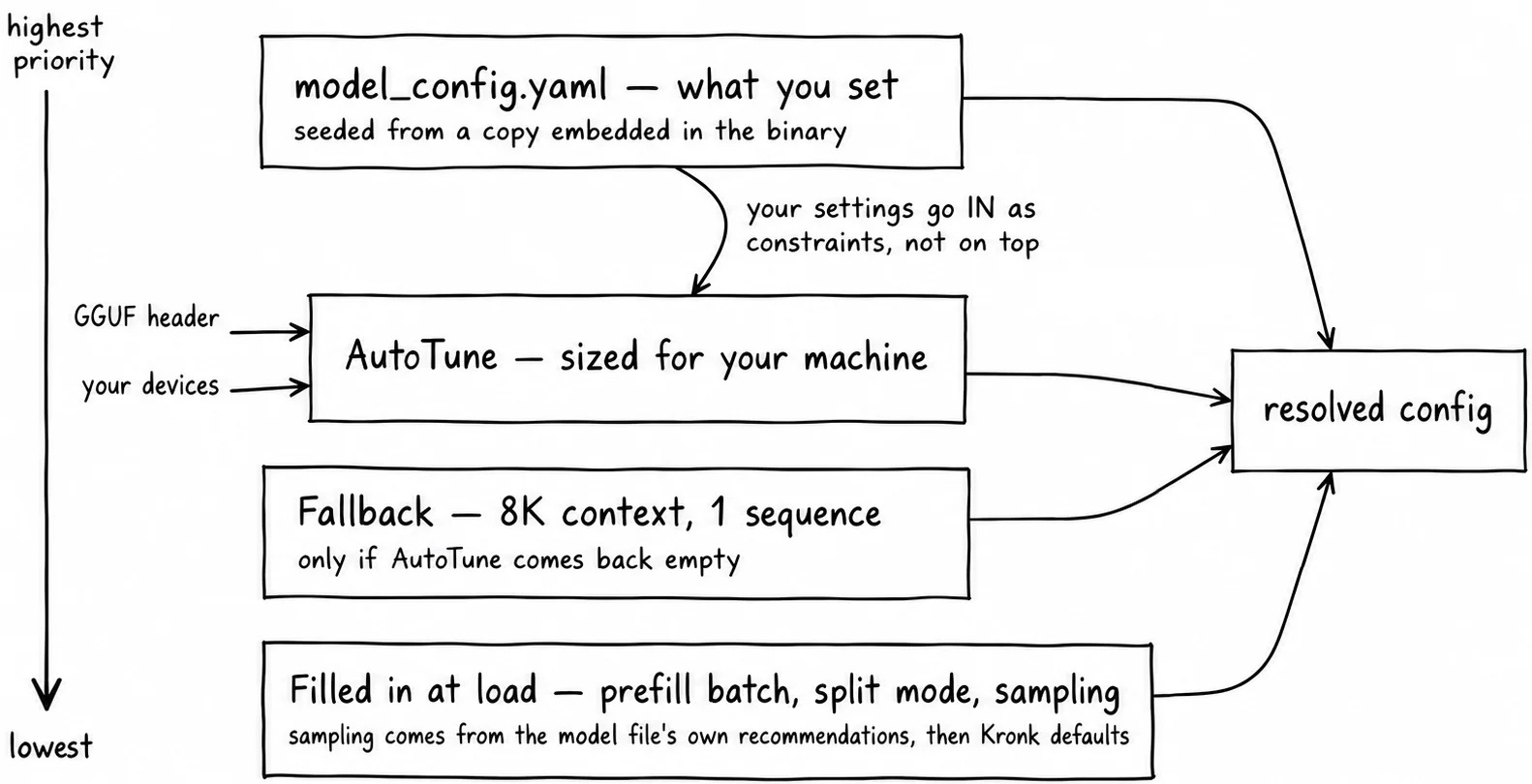
At the top of that stack, whatever model_config.yaml holds for that id. If that file doesn’t exist yet, it’s created from the built-in one that ships inside the binary, tuned entries for known models included (sdk/tools/defaults/yaml/model_config.yaml:170). Under it, AutoTune’s recommendation for your machine: context length, cache precision, GPU layers, concurrent sequences, all based on the GGUF header and your hardware. And under that, when AutoTune comes back empty, a deterministic fallback: one sequence, and 8K of context or the model’s training context if that’s shorter.
Those top two layers are less separate than the stack makes them look, which is what the curved arrow is about: anything you set is handed to AutoTune as a constraint it has to meet (sdk/tools/models/kronkresolve.go:50).
Anything still unset is filled in when the model loads: first the defaults the model file itself carries, and finally, if nothing else has an opinion, Kronk’s own (sdk/kronk/model/params.go:798).
And this is where profiles fit: the model_config.yaml entries are per profile, so the name you ask the model by decides which configuration comes out of that top layer.
Let’s dig a bit deeper into one of those layers: AutoTune, and how it decides.
How AutoTune decides
What AutoTune does is simple to state, now that we have the calculator: it runs that same arithmetic against your machine, over and over, until something fits.
Four things need deciding. The context window: how many tokens the model holds at once, prompt and reply together. The KV cache precision: keeping that cache at 16 bits (f16) or 8 bits (q8_0) per value. How many layers go on the GPU, since the rest run on the CPU, far more slowly. And how many sequences run at once, which is how many conversations the model can serve in parallel.
As we saw earlier, AutoTune gets the model’s metadata and your hardware information, and with that it goes after the largest context window it can afford — capped at 128K, or the model’s training context if that’s shorter — with a single sequence.
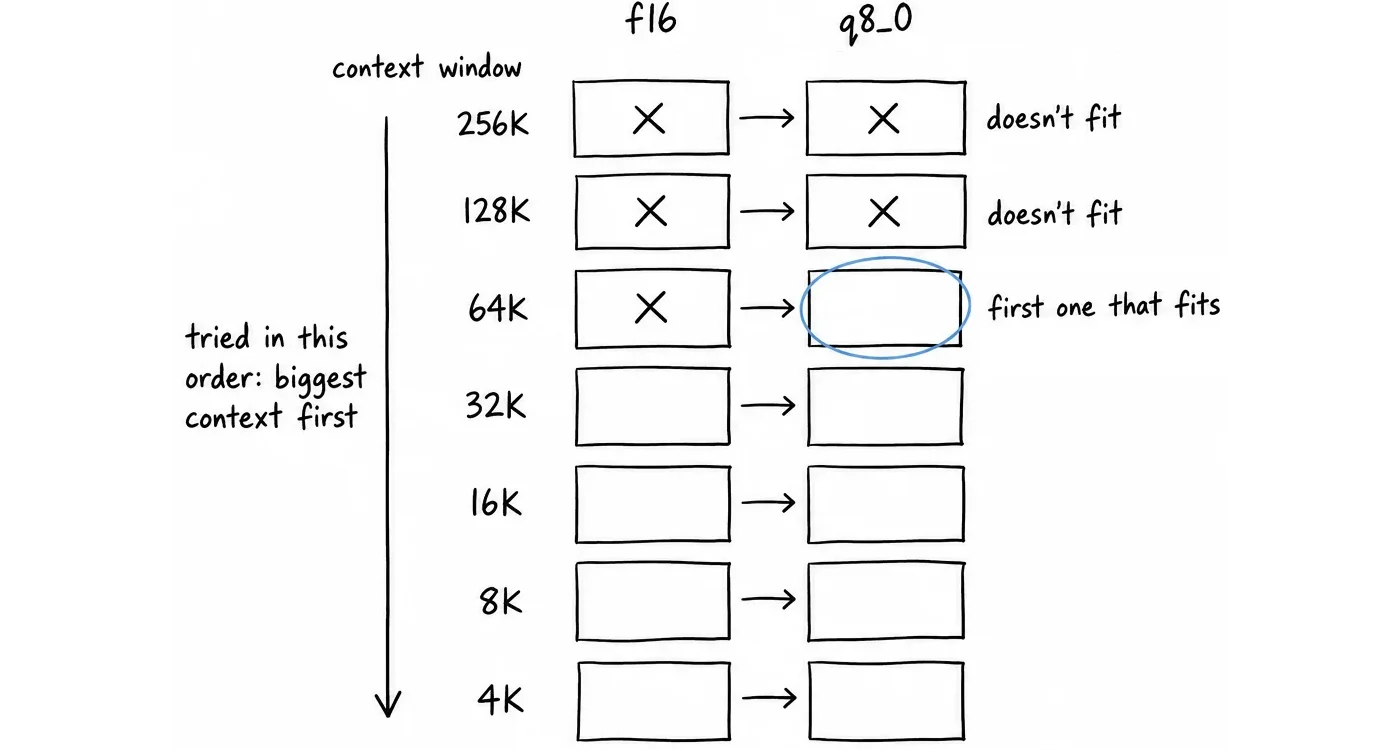
Read that grid the way AutoTune does and you have the entire policy (sdk/tools/models/analyze.go:455): context sizes from the largest down — 256K, 128K, 64K, on to 4K — trying f16 at each one before q8_0, and taking the first pair that fits. Which is a decision in disguise: context length is worth more than cache precision. Offered “128K at q8_0” or “64K at f16”, AutoTune takes the first.
And you may have noticed that grid only holds two of the four decisions. The other two aren’t searched: the layers all go on the GPU if there is one, and all on the CPU if there isn’t (sdk/tools/models/analyze.go:518), and the sequence count is fixed before the search starts and stays constant all the way through it, whether it came from your config or from the default of a single sequence (sdk/tools/models/analyze.go:422).
Back to the grid, because two things follow from that order. The first is what a constraint from your own config does here: set a context window and the grid narrows to that one row, leaving AutoTune only the cache precision to pick. It tries your context at f16, drops to q8_0 if that doesn’t fit, and if neither does it keeps your value anyway and reports that it doesn’t fit. What it never does is quietly hand you a smaller context than you asked for.
The second is that all of this is advisory. If the analysis can’t run, the load goes ahead regardless — on your own configuration, or on that fixed 8K-and-one-sequence fallback.
So the configuration is settled before anything is loaded. Which leaves the other half of the story: the loading itself.
Into memory
A request arrives for our model, and it isn’t loaded. Someone has to read those gigabytes off the disk, hand them to llama.cpp, and give the request something it can talk to — without loading the same model twice, and without loading it at all if there’s no room. All of that is one picture:
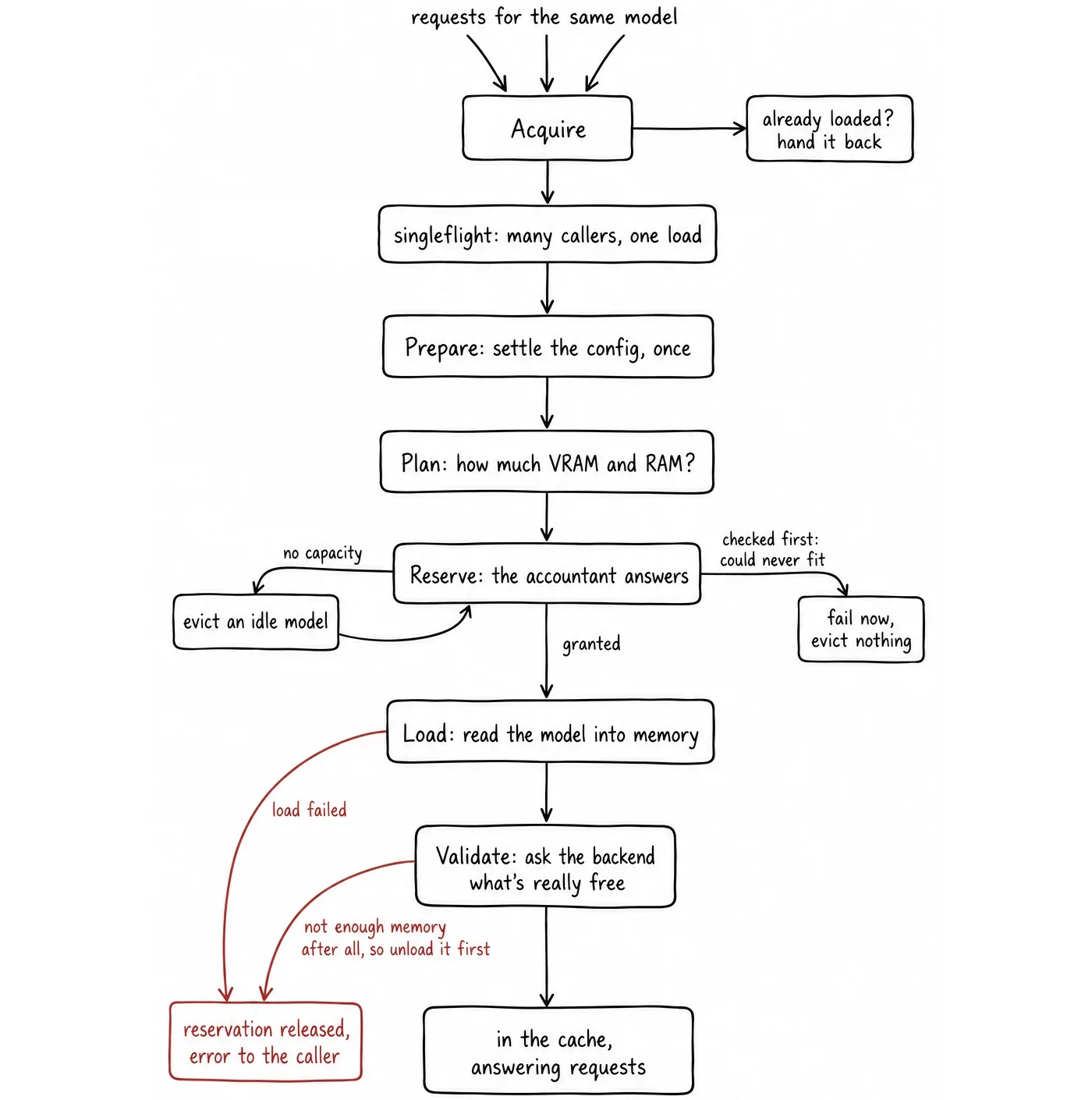
Before walking that sequence, it’s worth knowing that not every box is settled in the same place. Prepare, Plan, Load and Validate are handed to a loader, which is the only part here that speaks llama.cpp. And Reserve is a question put to resman, the resource manager: an accountant which tracks how much memory has been promised to whom.
Let’s start at the top. Acquire is the front door, and if the model is already loaded you get it straight back. What the cache holds is the loaded models themselves, and Kronk asks each of them only two things: how many requests are running on it right now, and please unload. That first question is what makes the rest safe, because a model with requests in flight is never evicted.
On a miss, the load goes through a singleflight group — Go’s way of saying “if several callers ask for the same thing at once, do the work once and give them all the same answer” (sdk/pool/engine/acquire.go:50). Ten requests for a cold model produce one load, and the other nine wait for its result. That matters a lot here: a load means reading twenty gigabytes off disk and claiming VRAM for it, so ten of them at once would each reserve memory, and the machine would fall over.
Then the four boxes, in that fixed order. Prepare settles the configuration once, so nothing downstream can disagree about what is being loaded — those are the numbers we just watched AutoTune pick. Plan runs the calculator over that configuration and turns the answer into a reservation: a claim on so much VRAM and so much RAM.
Reserve is where resman decides whether this model gets the memory it asked for, and it can answer in three ways. It can grant it. It can refuse outright, when the request could never fit even on an empty machine. Or it can make room: unload an idle model and try the reservation again. How that victim gets picked is the next section.
Only then does Load call kronk.NewWithContext, which is exactly where the previous article
started. The red arrows are what happens when it doesn’t work: the reservation goes straight back, the caller gets an error, and nothing half-loaded is left in the cache.
Everything up to here was arithmetic: a predicted footprint, a budget, a granted reservation, and not one question asked of a GPU driver. Validate is where the backend finally gets asked what’s really free, now that the model and all its buffers are in memory (sdk/kronk/pool/llama.go:378). CUDA (NVIDIA) and HIP (AMD) report the device’s real free memory, so a load whose numbers don’t add up is rejected. Metal and Vulkan don’t report a number you can trust, so there the check only logs what it found.
And at this point we have the model loaded in memory and in the cache, answering requests. So let’s see what happens when we load several of them instead of one.
Sharing the box
A model that’s already loaded has been paid for: its reservation is still held, its memory still spoken for, so a request for it takes the cache-hit branch at the top of that last diagram and goes straight to inference. None of what follows applies to it.
It gets interesting when somebody asks for a second model and the machine has only so much memory. Something has to say no.
llama.cpp for text and whisper.cpp for audio share a single budget, so a speech model and a chat model compete for exactly the same bytes.
Coordinating all of that is resman’s job, and it never hands out everything it has. Each GPU gets a percentage of its memory rather than all of it, and system RAM loses another 5% on top (sdk/pool/engine/resman/resman.go:84). The estimate is only an estimate, llama.cpp allocates things the calculator doesn’t model, and planning down to the last byte doesn’t fail politely — it crashes the process.
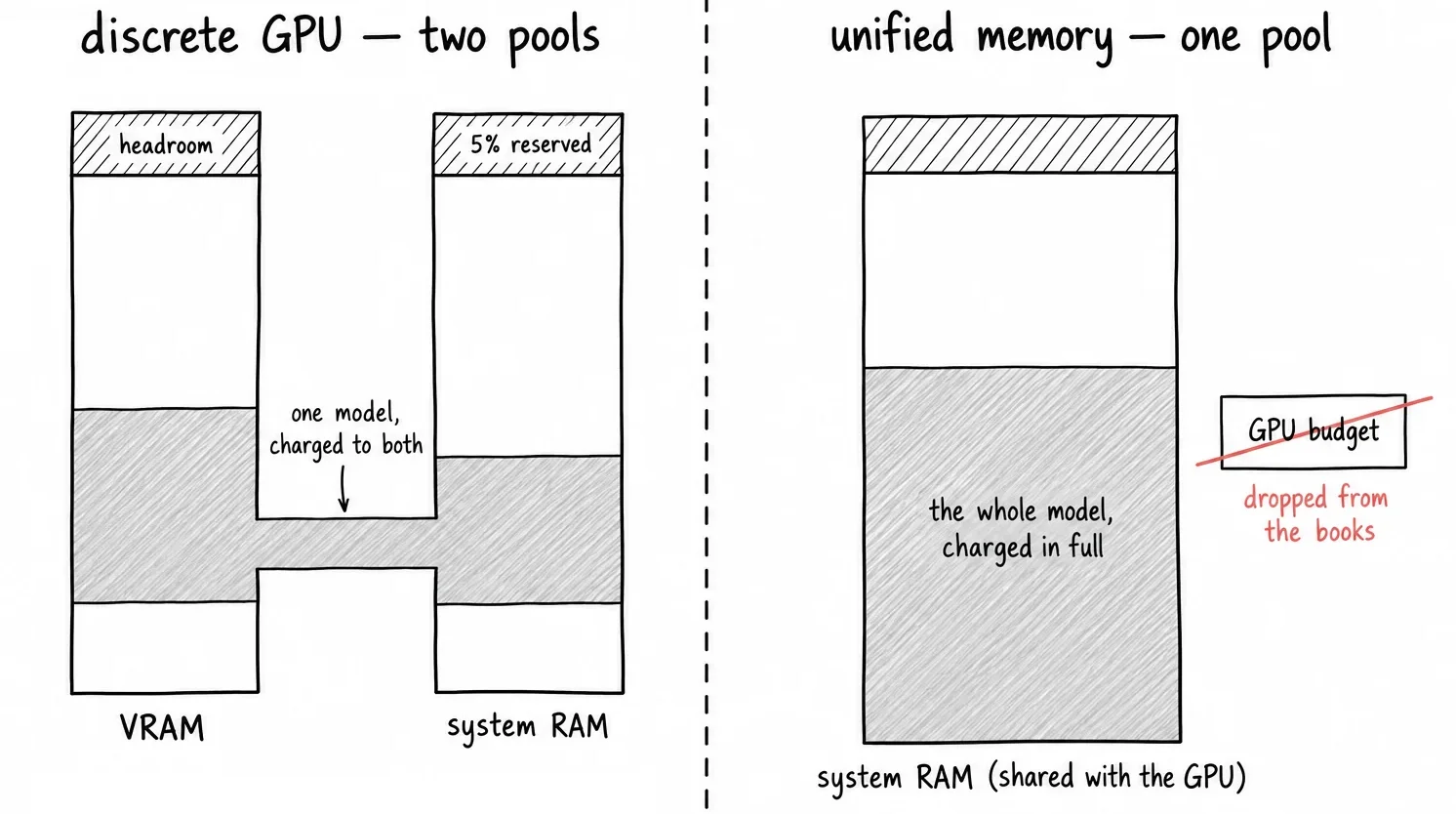
The two halves of that picture are the two cases. With a discrete GPU, VRAM and system RAM are separate pools, and one model can take memory from both. On Apple Silicon, or any integrated GPU, they’re the same physical bytes — unified memory — so Kronk charges the whole model to RAM and forgets the GPU has a budget at all (sdk/kronk/pool/llama.go:158).
When the budget runs out, some model has to be unloaded, and the order matters. First Kronk asks whether the request could fit on a completely empty machine. If it couldn’t, it fails immediately — otherwise it would unload every warm model one at a time and still fail.
If it could, a victim is chosen, and it isn’t simply the oldest one (sdk/pool/engine/eviction.go:74). That would unload a 44 GB model to free 4 GB. So Kronk takes the smallest idle model that frees enough on its own, and only falls back to oldest-first when none does — big models are slow to reload, so evicting small keeps the expensive ones warm. A model serving requests is never chosen.
So the machine is shared, the accounting is honest, and nobody is unloaded mid-sentence. And with that we’ve seen the whole machinery: finding a model, configuring it, loading it, and sharing the hardware between several of them without any of them stepping on each other. Let’s recap all of it.
Summary
We started with a name you type and finished with a model answering requests, and nearly everything in between turns out to be bookkeeping: .index.yaml for the models you have, catalog.yaml for what a name actually means, and one small calculator answering every “will it fit?” from the GGUF header and your hardware without ever asking a GPU.
AutoTune runs that calculator until something fits, trading cache precision for context length and never quietly giving you less than you asked for. Then Kronk makes the prediction real: one load for ten simultaneous requests, memory claimed before it’s used, the backend asked what’s really free once everything is allocated, and nothing unloaded mid-sentence when the machine fills up.
We now have a model on disk, sized for the hardware, loaded into a pool, with an SDK ready to run inference on it. What’s left is the part everybody actually touches: the HTTP server that turns all of this into an OpenAI-compatible endpoint. The Kronk model server is up next.